Contents
- Supply Chain Attacks on GitHub
- Butler to the Rescue
- Install Butler & Download Workflows
- Finding Unpinned Actions
- Finding Unpinnable Actions
- Summary
Supply Chain Attacks on GitHub
I'll assume you are already aware of the compromises of tj-actions/changed-files, aquasecurity/trivy-action, and actions-cool/issues-helper.
Everything is on fire, and you have been assigned the task of "pinning all GitHub actions" across your organisation to prevent Supply Chain attacks via 3rd party actions.
Great, but where does one begin to tackle this task? We have 2 fronts we need address:
-
Unpinned Actions: These are actions that you call from your own workflows but reference them via a tag (
@v1,@latest) or via a branch (@main) instead of a commit SHA. - Unpinnable Actions: These are actions that are called from 3rd party actions and do not reference a commit SHA. So you can pin the "parent" action but the "child" action is still using unpinned references.
Get in, I'll explain in the car.
Butler to the Rescue
Butler is a tool I wrote last year that was originally intended to be a security scanner for GitHub Actions, but as I was developing it I realised that I'd never be able to beat zizmor (if you haven't used it, you should). So I pivoted to an "insights" tool that will allow you to query your workflows from a sqlite database.
In this example we will use Butler to identify unpinned and unpinnable actions against the AWS GitHub Organisation.
Install Butler & Download Workflows
The first thing we need to do is create a GitHub API key (also known as GITHUB_TOKEN) and download all repos from AWS into a database:
# Create virtual environment
python3 -m venv venv
. venv/bin/activate

# Install requirements
pip3 install -r requirements.txt

# Set GITHUB_TOKEN
export GITHUB_TOKEN=ghp_....

# Download all AWS repos
python butler.py download --repo "aws" --database ./aws.db --threads 10 --all-repos --very-verbose
Once the download is complete, we need to "process" it in order to convert all workflows into something we can query:
python butler.py process --database ./aws.db --threads 10 --very-verbose
That's it, we are ready for action.
Butler already has built-in reports that you can use, but I thought that having targeted queries to identify these actions would be best.
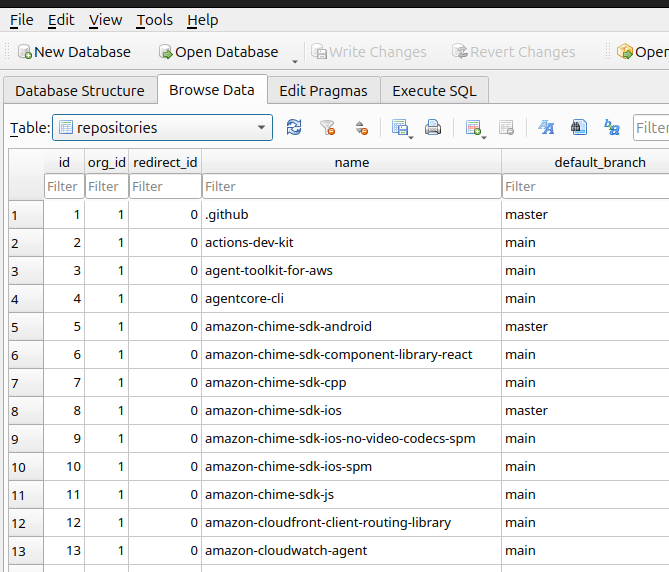
Open aws.db with SQLiteBrowser and this is what it should look like:
Finding Unpinned Actions
To find all unpinned actions run the following query:
SELECT
	-- Action.
	o.name		AS action_org_name,
	r.name		AS action_repo_name,
	r.ref		AS action_ref,
	r.archive	AS action_is_archived,
	w.path		AS action_path,
	r.stars		AS action_stars,
	CONCAT(
		'https://github.com/',
		o.name,
		'/',
		r.name,
		'/blob/',
		r.ref_commit,
		'/',
		w.path
	) 		AS action_url,

	-- Parent workflow.
	o2.name		AS parent_org_name,
	r2.name		AS parent_repo_name,
	r2.ref		AS parent_ref,
	r2.archive	AS parent_is_archived,
	w2.path		AS parent_path,
	CONCAT(
		'https://github.com/',
		o2.name,
		'/',
		r2.name,
		'/blob/',
		r2.ref_commit,
		'/',
		w2.path
	) 		AS parent_url
FROM workflows 		w
JOIN repositories 	r 			ON r.id = w.repo_id
JOIN organisations 	o 			ON o.id = r.org_id
-- Where this action is being called from
JOIN workflow_relationships wr 	ON wr.child_id = w.id
-- Retrieve its parent workflow
JOIN workflows		w2			ON w2.id = wr.parent_id
JOIN repositories 	r2 			ON r2.id = w2.repo_id
JOIN organisations 	o2 			ON o2.id = r2.org_id
WHERE
	-- action = 2
	w.type = 2
	-- commit = 3
	AND r.ref_type != 3
	-- trusted orgs, including the org itself
	AND LOWER(o.name) NOT IN('actions', 'github', 'advanced-security', 'aws')
	-- Only where the parent workflow is the org itself.
	AND LOWER(o2.name) IN('aws')
ORDER BY 1, 2, 3, 4, 5
Unpinned Samples
- aws/aws-encryption-sdk-c/.github/workflows/clang-format.yml calls DoozyX/clang-format-lint-action@v0.17
- aws/s2n-netbench/.github/workflows/ci.yml calls EmbarkStudios/cargo-deny-action@v1
- aws/amazon-q-developer-cli/.github/workflows/rust.yml calls EmbarkStudios/cargo-deny-action@v2
- aws/s2n-quic/.github/workflows/dependencies.yml calls EmbarkStudios/cargo-deny-action@v2
Finding Unpinnable Actions
Go find all unpinnable actions run the following query:
SELECT
	-- Action.
	o.name		AS action_org_name,
	r.name		AS action_repo_name,
	r.ref		AS action_ref,
	r.archive	AS action_is_archived,
	w.path		AS action_path,
	r.stars		AS action_stars,
	CONCAT(
		'https://github.com/',
		o.name,
		'/',
		r.name,
		'/blob/',
		r.ref_commit,
		'/',
		w.path
	) 			AS action_url,

	-- Action.
	o2.name		AS unpinnable_action_org_name,
	r2.name		AS unpinnable_action_repo_name,
	r2.ref		AS unpinnable_action_ref,
	r2.archive	AS unpinnable_action_is_archived,
	w2.path		AS unpinnable_action_path,
	r2.stars	AS unpinnable_action_stars,
	CONCAT(
		'https://github.com/',
		o2.name,
		'/',
		r2.name,
		'/blob/',
		r2.ref_commit,
		'/',
		w2.path
	) 		AS unpinnable_action_url,

	-- Parent workflow.
	o3.name		AS parent_org_name,
	r3.name		AS parent_repo_name,
	r3.ref		AS parent_ref,
	r3.archive	AS parent_is_archived,
	w3.path		AS parent_path,
	CONCAT(
		'https://github.com/',
		o3.name,
		'/',
		r3.name,
		'/blob/',
		r3.ref_commit,
		'/',
		w3.path
	) 		AS parent_url
FROM workflows 		        w
JOIN repositories 	        r	ON r.id = w.repo_id
JOIN organisations 	        o	ON o.id = r.org_id
-- Where this action is being called from
JOIN workflow_relationships wr 	ON wr.child_id = w.id
-- Retrieve its parent workflow
JOIN workflows		        w2	ON w2.id = wr.parent_id
JOIN repositories 	        r2	ON r2.id = w2.repo_id
JOIN organisations 	        o2	ON o2.id = r2.org_id
-- Find the top-most workflow.
JOIN workflow_tree 	        wt	ON wt.child_id = w2.id
JOIN workflows 		        w3	ON w3.id = wt.parent_id
JOIN repositories 	        r3	ON r3.id = w3.repo_id
JOIN organisations 	        o3	ON o3.id = r3.org_id
WHERE
	-- action = 2
	w.type = 2
	-- commit = 3
	AND r.ref_type != 3
	-- trusted orgs, including the org itself
	AND LOWER(o.name) NOT IN('actions', 'github', 'advanced-security', 'aws')
	-- Only where the parent workflow is not the org itself.
	AND LOWER(o2.name) NOT IN('aws')
	-- Only where the topmost workflow is in the org itself.
	AND LOWER(o3.name) IN ('aws')
ORDER BY 1, 2, 3, 4, 5
Unpinnable Samples
- aws/amazon-inspector-container-image-scanner-jenkins-plugin/.github/workflows/jenkins-maven-cd.yaml calls jenkins-infra/github-reusable-workflows/.github/workflows/maven-cd.yml which calls jenkins-infra/interesting-category-action@v1.2.1
- aws/aws-advanced-jdbc-wrapper/.github/workflows/release_draft.yml calls slsa-framework/slsa-github-generator/.github/workflows/generator_generic_slsa3.yml which calls slsa-framework/slsa-github-generator/.github/actions/detect-workflow-js@v2.1.0
Summary
Butler can provide visibility into workflows and actions across your entire organisation and enable you to implement guardrails at scale.
But other than that, good luck fellow traveler.